Creating Dapp's Using ERC-721, Ganache, Brave, MetaMask, Truffle-React UI & Firebase Private Data
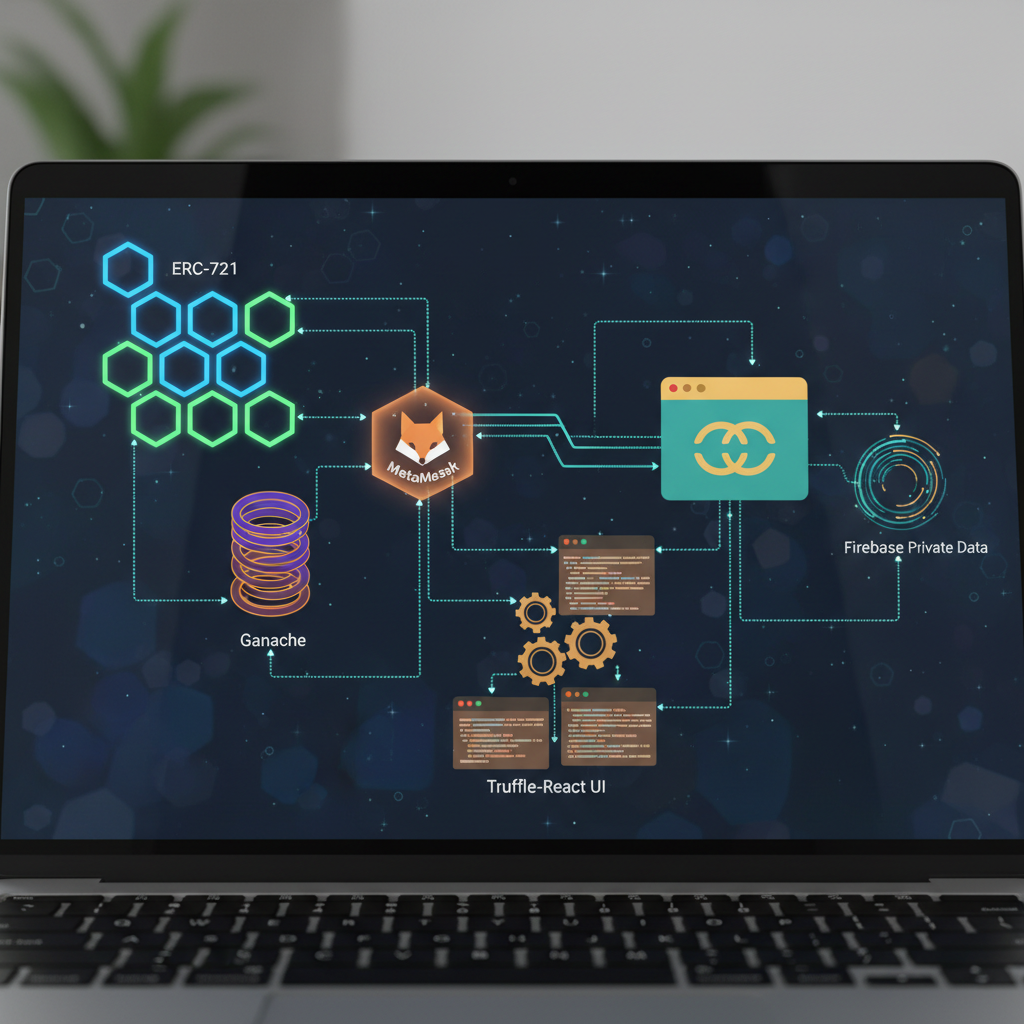
A useful NFT application needs more than a mint button. It needs a contract that tracks ownership, a wallet that approves transactions, a UI that handles confirmation delays, and a clear boundary between public blockchain records and private application data.
We’ll build that boundary with an ERC-721 collectible, Ganache for local Ethereum development, Brave with MetaMask, a Truffle-generated React project, and Firebase for wallet-linked private notes. The result is a local development foundation, not a production-ready marketplace.
This walkthrough uses the tooling available in 2019; package APIs, browser interfaces, and network options may have changed since then.
What belongs on-chain, and what does not
Our contract stores token ownership and a public metadata URI. React reads the contract and asks MetaMask to sign transactions. A small backend verifies wallet signatures and issues Firebase authentication tokens. Firestore stores notes that only their authenticated author can access.
Two distinctions matter:
- ERC-721 ownership is public. Solidity’s
privatekeyword does not make blockchain data confidential. - Firebase is centralized infrastructure. Adding it makes this a hybrid application, not a fully decentralized system.
Here, private notes belong to a wallet account. They do not transfer when an NFT changes hands. Token-holder-only documents require a different authorization design that rechecks current ownership.
1. Set up a compatible local toolchain
Use Node.js 10 LTS, npm 6, Truffle 5, Ganache CLI 6, and MetaMask. Install MetaMask from its official listing in Brave. Chrome can serve as a fallback if an extension behaves differently in your Brave release.
Start the project:
npm install -g truffle@5 ganache-cli@6
mkdir explorer-dapp
cd explorer-dapp
truffle unbox react
npm install openzeppelin-solidity@2.3.0
The React Truffle Box supplies a contract workspace and a React client. This is our “Truffle-React UI”: a scaffold we connect to contract artifacts, not a guarantee that arbitrary contracts automatically become polished components.
Keep the generated lockfiles. Box contents and transitive dependencies can change, so record the working versions before sharing the project.
Run Ganache in a separate terminal:
ganache-cli --host 127.0.0.1 --port 8545 --networkId 5777
Ganache prints funded accounts and private keys. Import the first account into MetaMask and configure a custom RPC network pointing to http://127.0.0.1:8545.
These keys are disposable development credentials. Never fund them on a public network. Keep Ganache bound to localhost, and do not use your everyday wallet seed for testing.
If Brave exposes another wallet provider, disable the competing integration for this exercise. Multiple injected providers can make the application connect to the wrong wallet.
2. Configure Truffle and write the ERC-721 contract
Use the root contracts/ directory created by the box; do not introduce an unrelated nested contract folder.
Configure truffle-config.js:
module.exports = {
  contracts_build_directory: "./client/src/contracts",
  networks: {
    development: {
      host: "127.0.0.1",
      port: 8545,
      network_id: "5777"
    }
  },
  compilers: {
    solc: { version: "0.5.0" }
  }
};
The artifact directory lets React import the ABI and deployment addresses. Network ID identifies the deployment entry; it is not interchangeable with a transaction’s chain ID.
Create contracts/ExplorerToken.sol:
pragma solidity ^0.5.0;

import "openzeppelin-solidity/contracts/token/ERC721/ERC721Full.sol";
import "openzeppelin-solidity/contracts/ownership/Ownable.sol";

contract ExplorerToken is ERC721Full, Ownable {
    uint256 public nextTokenId;

    constructor() public ERC721Full("Explorer", "EXP") {}

    function mint(address recipient, string memory uri)
        public
        onlyOwner
        returns (uint256)
    {
        uint256 tokenId = nextTokenId;
        nextTokenId += 1;
        _safeMint(recipient, tokenId);
        _setTokenURI(tokenId, uri);
        return tokenId;
    }
}
OpenZeppelin supplies standard ownership, approval, transfer, and metadata behavior. onlyOwner deliberately restricts minting to the deploying account. _safeMint checks that contract recipients support receiving ERC-721 tokens.
A token URI should reference public metadata, typically JSON with fields such as name, description, and image. Do not put Firebase credentials, private notes, or secret download links in it. Mutable hosting also means the referenced content can change without a token transfer.
3. Deploy and test before building the interface
Add migrations/2_deploy_explorer.js, replacing any sample migration using that number:
const ExplorerToken = artifacts.require("ExplorerToken");

module.exports = function(deployer) {
  deployer.deploy(ExplorerToken);
};
Compile and deploy:
truffle compile
truffle migrate --network development
Create test/explorer.js:
const ExplorerToken = artifacts.require("ExplorerToken");

contract("ExplorerToken", accounts => {
  it("mints token zero to the requested owner", async () => {
    const token = await ExplorerToken.new();
    await token.mint(accounts[1], "https://example.org/0.json");
    assert.equal(await token.ownerOf(0), accounts[1]);
    assert.equal((await token.balanceOf(accounts[1])).toString(), "1");
  });

  it("rejects minting by a non-owner", async () => {
    const token = await ExplorerToken.new();
    let reverted = false;
    try {
      await token.mint(accounts[1], "", { from: accounts[1] });
    } catch (error) {
      reverted = /revert/.test(error.message);
    }
    assert(reverted, "unauthorized mint should revert");
  });
});
Run truffle test --network development. Expand coverage to transfers, approvals, nonexistent tokens, and contract recipients before considering deployment beyond Ganache.
Local tests catch mistakes; they do not establish that a contract is secure.
4. Connect React to MetaMask
Inside client, install the frontend dependencies:
npm install web3@1.2.1 firebase@7.2.0
Use the following connection helper in the React client:
import Web3 from "web3";
import artifact from "./contracts/ExplorerToken.json";

export async function connect() {
  if (!window.ethereum) throw new Error("Install MetaMask first");
  await window.ethereum.enable();

  const web3 = new Web3(window.ethereum);
  const accounts = await web3.eth.getAccounts();
  const networkId = await web3.eth.net.getId();
  const deployment = artifact.networks[networkId];
  if (!deployment) throw new Error("Switch to the Ganache network");

  const token = new web3.eth.Contract(artifact.abi, deployment.address);
  return { web3, token, account: accounts[0] };
}
The enable() call reflects MetaMask’s 2019 permission flow. Trigger it from a Connect button rather than surprising visitors with a prompt on page load.
A mint handler can then use:
const { token, account } = await connect();
await token.methods
  .mint(account, "https://example.org/0.json")
  .send({ from: account });
const balance = await token.methods.balanceOf(account).call();
Attach this handler to a React button and display the returned balance in component state. Use the imported first Ganache account: other accounts cannot mint under this contract’s policy.
Disable the button while the transaction is pending, catch wallet rejection, and refresh reads after the receipt arrives. A submitted transaction hash is not confirmation. Also reset application state when MetaMask changes accounts or networks; do not keep displaying data for an old wallet.
5. Authenticate wallet owners with Firebase
An address supplied by the browser is not proof of ownership. Anyone can submit someone else’s address. Instead, have the wallet sign a short-lived, single-use challenge, verify the signature on a trusted server, and issue a Firebase custom token.
Create a Firebase project, enable Cloud Firestore, register a web application, and obtain an Admin SDK service-account credential for your backend. Keep that credential outside the repository and frontend bundle.
In a separate server directory, initialize npm and install Express 4, Firebase Admin 8, and Web3 1.2.1. This compact server demonstrates the authentication flow:
const express = require("express");
const crypto = require("crypto");
const admin = require("firebase-admin");
const Web3 = require("web3");

admin.initializeApp({ credential: admin.credential.applicationDefault() });
const app = express();
const web3 = new Web3();
const pending = new Map();
app.use(express.json({ limit: "8kb" }));

app.post("/nonce", (req, res) => {
  const address = String(req.body.address || "").toLowerCase();
  if (!web3.utils.isAddress(address)) return res.sendStatus(400);
  const expires = Date.now() + 5 * 60 * 1000;
  const message = [
    "Explorer local login: http://localhost:3000",
    `Wallet: ${address}`,
    `Nonce: ${crypto.randomBytes(32).toString("hex")}`,
    `Expires: ${new Date(expires).toISOString()}`
  ].join("\n");
  pending.set(address, { message, expires });
  res.json({ message });
});

app.post("/login", async (req, res) => {
  const address = String(req.body.address || "").toLowerCase();
  const challenge = pending.get(address);
  if (!challenge || challenge.expires < Date.now()) {
    return res.sendStatus(401);
  }
  try {
    const recovered = web3.eth.accounts.recover(
      challenge.message, req.body.signature
    ).toLowerCase();
    if (recovered !== address) return res.sendStatus(401);
    pending.delete(address);
    const token = await admin.auth().createCustomToken(address);
    res.json({ token });
  } catch (error) {
    res.sendStatus(401);
  }
});

app.listen(3001, "127.0.0.1");
Set GOOGLE_APPLICATION_CREDENTIALS to your service-account file before starting this server. Add "proxy": "http://localhost:3001" to the React client’s package.json, then restart its development server.
This example authenticates ordinary key-controlled wallets, not smart-contract wallets. Production needs HTTPS, rate limiting, persistent challenges with atomic consumption, expiration cleanup, and a fixed application-specific login domain. An in-memory map is only suitable for this single-process local demonstration.
6. Save genuinely access-controlled private data
Initialize Firebase in the client using your project’s web configuration:
import firebase from "firebase/app";
import "firebase/auth";
import "firebase/firestore";

firebase.initializeApp(firebaseConfig);

async function post(path, body) {
  const response = await fetch(path, {
    method: "POST",
    headers: { "Content-Type": "application/json" },
    body: JSON.stringify(body)
  });
  if (!response.ok) throw new Error("Authentication failed");
  return response.json();
}

export async function saveNote(web3, account, text) {
  const address = account.toLowerCase();
  const { message } = await post("/nonce", { address });
  const signature = await web3.eth.personal.sign(
    web3.utils.utf8ToHex(message), account, ""
  );
  const { token } = await post("/login", { address, signature });
  await firebase.auth().signInWithCustomToken(token);
  await firebase.firestore().doc(`privateNotes/${address}`).set({ text });
}
Call this from a Save Note button using the connection helper’s web3 and account. Signing this login message costs no gas and does not authorize a blockchain transaction.
Deploy restrictive Firestore rules before testing:
rules_version = '2';
service cloud.firestore {
  match /databases/{database}/documents {
    match /privateNotes/{uid} {
      allow read, delete: if request.auth != null
                         && request.auth.uid == uid;
      allow create, update: if request.auth != null
                            && request.auth.uid == uid
                            && request.resource.data.keys().hasOnly(['text'])
                            && request.resource.data.text is string
                            && request.resource.data.text.size() <= 5000;
    }
  }
}
Firebase web configuration is not an authorization secret; security comes from authentication and rules. Admin SDK access bypasses these rules, so protect server credentials carefully. This design restricts application users, not project administrators, and does not provide end-to-end encryption.
Common pitfalls and final checks
Before calling the prototype complete:
- Test denied access. A second wallet must not read the first wallet’s Firestore document.
- Test replay protection. Reusing a successful login signature must fail.
- Handle wallet switching. Sign out of Firebase, clear private state, and authenticate the new account.
- Expect Ganache resets. Redeploy contracts and refresh artifacts after resetting the chain; clear stale wallet transaction state if necessary.
- Keep metadata public. Never confuse an obscure URL with access control.
Takeaway
ERC-721 handles public ownership, MetaMask handles wallet approval, Truffle and Ganache provide a repeatable development loop, and Firebase handles explicitly centralized private data. Keeping those responsibilities separate makes the application easier to test, and makes its privacy promises much more honest.
Conversation (0)
No comments yet. Start the conversation.
Join the conversation
Create a free member account to comment.